
ASCII art that fits a Discord message
ASCII art in a chat only keeps its shape inside a code block, and only if it fits: narrow enough for a phone, short enough for one message. Here is how to make art that does both - and why Braille characters are the trick.
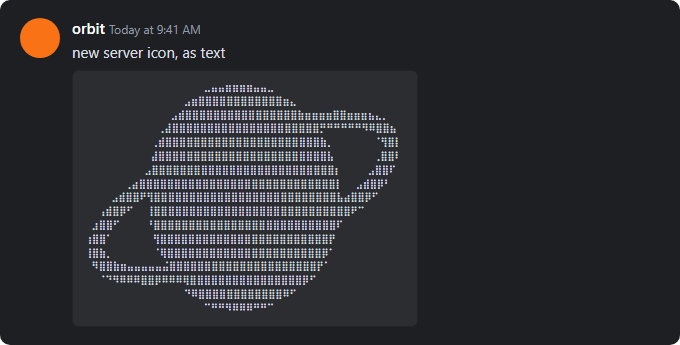
How to post ASCII art in Discord
- Convert the image with the button above - 46 characters across, Braille characters, one color.
- Copy the text with Copy text.
- In the message box, type three backticks, press Shift+Enter, paste, press Shift+Enter again, and type three more backticks.
- Send. The code block uses a monospace font and keeps every space, so the art arrives in one piece.
```
(paste the art here)
```
Width and length
- Width
- A code block wraps long lines on a narrow screen, and wrapped art is unreadable. Up to about 40 to 50 characters survives a phone; 80 is fine if everyone reads on a desktop.
- Length
- A standard Discord message holds 2000 characters, counting every space and line break. 46 characters across by 40 rows is about 1900 - right at the edge. Lower the Detail slider if Discord refuses the message.
Why Braille is the trick
Every Braille character is a 2 by 4 grid of dots - eight pixels in one character. A 46 character line of Braille carries the detail of a 92 pixel wide image, where ordinary ASCII would carry 46. In a chat, where width and length are both limited, that is the difference between a recognizable logo and a smudge.
The catch: the reader's device needs a font with the Braille block, which every current phone and desktop has. Quadrant blocks (four pixels per character) are the next best choice, and the Standard set works everywhere.
What about color?
Discord's desktop app can color a code block marked ansi, using a small set of basic
ANSI colors; the mobile apps show it uncolored. For art that looks the same for everyone, post
plain text - the shape carries it. If you do try color, use the 16 colors mode and the .ansi
export.
Other chat apps
The same art works anywhere with a monospace code block: Slack and Microsoft Teams (three backticks), Telegram and WhatsApp (three backticks), Matrix clients, forums with Markdown. Where there is no code block, export a PNG and post it as an image instead - or use Copy image to paste it straight in.
Questions about ASCII art in chat
- Why does my ASCII art look broken on a phone?
- The lines are wider than the phone screen, so the code block wraps them. Make the art narrower - about 40 to 50 characters across - and use Braille characters to keep the detail.
- Why does Discord say my message is too long?
- A standard message holds 2000 characters, and ASCII art counts every space and line break. Lower the Detail slider, or crop the image tighter, until the art fits.
- Do I have to use a code block?
- Yes. Outside a code block the text is set in a proportional font and repeated spaces are collapsed, so the art falls apart. Three backticks before and after fixes both.
- Can I send it as an image instead?
- Yes - Copy image puts the rendered PNG on your clipboard, ready to paste into the message box. An image keeps its colors and never wraps, but it cannot be copied as text.
More guides
- Image to ASCII - photos, logos and illustrations, and the settings for each
- Text to ASCII art - FIGlet banners in 12 fonts
- ASCII art for a GitHub README - your logo as text in a README
- Terminal and SSH login banners - ANSI color banners for MOTD and your shell
- Examples - before and after, with the settings behind each
- FAQ - privacy, formats, licensing and troubleshooting