
Put your logo in a README as ASCII art
A logo in a README is usually an image hosted somewhere else. As ASCII art it is just
text: it renders on every code host, shows up when someone runs cat README.md, survives
forks and mirrors, and needs nothing hosted.
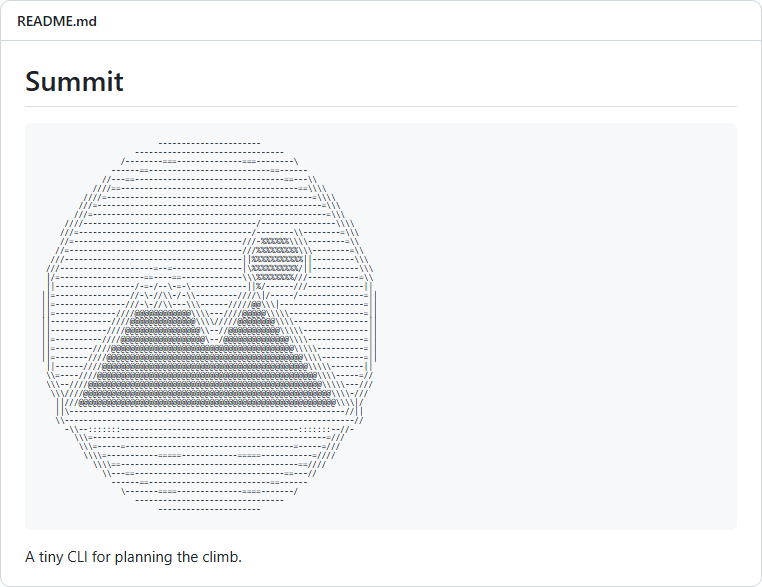
Step by step
- Open the converter with the README settings - the button above sets 80 characters across, the Standard character set, one color and a 1.45 line height.
- Drop in your logo. A transparent PNG or an SVG works best.
- Check the width. 60 to 80 characters fits a phone and a laptop; up to 100 is fine on a desktop.
- Download the .md file - it is a fenced code block, ready to paste, with the fence lengthened automatically if the art itself contains backticks.
- Paste it at the top of README.md, above the project description, and commit.
The fenced code block
ASCII art in Markdown has to sit in a code block, or the renderer collapses the spaces that hold it together. The .md export writes the fence for you; it looks like this:
```text
                      _ _
  ____  _ _ __  _ __ (_) |_
 (_-< || | '  \| '  \| |  _|
 /__/\_,_|_|_|_|_|_|_|_|\__|
```
The text after the opening fence stops a renderer from guessing a programming
language and coloring random characters.
Keep the proportions
Code blocks on GitHub use a line height of about 1.45, so each line of text is taller than the tightly packed preview. Art made for a line height of 1 comes out stretched vertically - a circle turns into an egg.
The fix is to tell the converter about it: set Line height under Typography to 1.45 (the README preset does this). The converter then uses fewer, taller rows, and the art lands in proportion in the README.
Light mode, dark mode and color
Plain text in a code block takes the theme's own text color, so one-color ASCII art reads in both light and dark mode with no work at all. That is why the README preset uses one color.
Colored ASCII art does not survive in a README: GitHub strips inline styles from HTML in Markdown. If you want color, export a PNG and add it as an image - with the ASCII text in the alt text, or as a collapsed section below it.
Works in any Markdown renderer
Nothing here is specific to GitHub. A fenced code block renders the same in GitLab, Bitbucket, Gitea, npm and PyPI package pages, static-site generators and documentation tools - and in a plain terminal, which is where a README is often read first.
Questions about ASCII art in a README
- Should I use the .md or the .txt export?
- Use .md for a README: it is already wrapped in a fenced code block. Use .txt when you are pasting into something that is not Markdown, such as a source file comment.
- How wide can ASCII art be in a GitHub README?
- Wider art scrolls sideways inside the code block instead of wrapping, so nothing breaks - but it stops being visible at a glance. Aim for 60 to 80 characters, and no more than about 100.
- Why does my logo look stretched in the README?
- GitHub code blocks use a taller line height than the preview. Set Line height to 1.45 under Typography before you export, and the converter allows for it.
- Can I add a colored logo to a README?
- Not as text - GitHub removes the inline styles that carry the color. Export a PNG for a colored logo, and keep a one-color ASCII version for anyone reading in a terminal.
More guides
- Image to ASCII - photos, logos and illustrations, and the settings for each
- Text to ASCII art - FIGlet banners in 12 fonts
- Terminal and SSH login banners - ANSI color banners for MOTD and your shell
- ASCII art for Discord - art that fits a message and a phone screen
- Examples - before and after, with the settings behind each
- FAQ - privacy, formats, licensing and troubleshooting